SOFTWARE
Benchmark Sidekick
Your business knowledge and sales assistant.
ANSWERS. ACTIONS. YOUR NEXT STEP.
Your business knowledge and sales assistant.
Find product answers, continue to your company’s pricing in Quick Quote, and know what needs attention next. Bring customer work, reviewed follow-up and source-linked research into one workspace.
- Eight ways to work: Ask, Customers, Quick Quote, Re/Engage, My Day, Pricing, Product specs and Research.
- Product and warranty help: search supported official manufacturer sites or use administrator-reviewed company references, with source links and document revisions. Product research works without selecting a customer.
- Protected company pricing: Pricing continues to your authorized company/store catalog in Quick Quote. Missing prices need review; public research does not supply private company prices.
- Keep your place: unfinished questions and selected customer/project context stay in the current tab for up to 30 minutes. Customer access is checked again when you return. Resume a quote with freshly validated scope and review its estimate preview.
- One workspace: start from Workspace Home, choose your personal opening page and switch among assigned tools from a compact desktop launcher or phone sheet.
- Beside your work: open Ask Sidekick beside CRM or Re/Engage customer work, or launch a separate browser window from Desktop widgets. Quick Quote opens company-scoped Sidekick help while keeping your estimate open. Use your phone keyboard’s dictation microphone, review the text, then submit.
Example: ask about a carpet warranty, review the cited source and exact style/date requirements, then select the customer and save a reviewed note. Start Quick Quote by finding or adding the intended customer and choosing the opportunity.
Available to activated pilot accounts: customer coordination, reviewed AI help, source-linked product research and the updated workspace interface. AI account activation, company references, supported manufacturers and usage allowances require setup. Shared customer AI and research request spacing is three seconds; provider limits can still apply.
Private information stays scoped: company reference audiences and customer access rules apply. Official-site search uses only the selected manufacturer, confirmed public product/SKU and research topic. Customer records, private references and the staff question are excluded from web search. Search results do not prove warranty coverage; confirm the exact style, purchase date and applicable document.
Review stays with your team: drafts, notes, tasks and estimates use their existing review and save controls. Core remains responsible for calculations. Permission, approvals, pauses and verified delivery still govern customer messages.
Separate native-app work: Siri integration and native iPhone home-screen widgets are planned, not included in this web release. The Sidekick window is a browser tool. Dictation uses your operating system; Sidekick does not record audio.
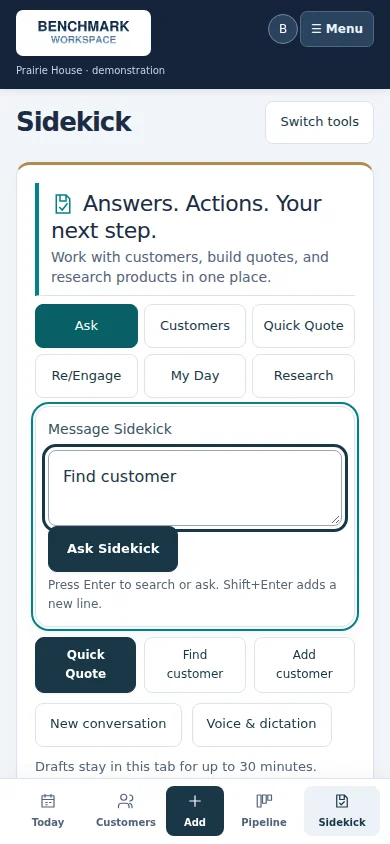
See quote preparation and contextual help


Make it work for your business.
We confirm the scope, access and setup with you before activation.